
目次
AIエージェントのデプロイパイプラインを考える
みなさん、AIエージェント作ってますか?
AWS上でAIエージェントをデプロイするのに、Amazon Bedrock AgentCore(以下、AgentCore)は、もはやなくてはならないサービスですね。
PoCであればAgentCore CLIでデプロイしていたAIエージェントも、プロダクション環境となると、他のアプリケーションと同様にリポジトリでソース管理されていて、ブルーグリーンデプロイしたい場面が訪れるのではないかと思います。
今回は、GitHubでソース管理されているAIエージェントをAgentCore Runtimeにブルーグリーンデプロイするという想定で考えていきます。
最終的にやりたいことは以下の2つです。
- 不具合のあるビルドを公開する前に止める
- 品質が保てているかの判定をする
AIエージェントにおいてやっかいなのは、HTTP 200を返していても、正常に動いているかは保証できないところかなと思います。
ただ、いきなりそこまでもっていくのは大変なので、今回は前者の「不具合のあるビルドを公開する前に止める」までをやります。
AgentCoreだけでは組めない
AgentCore Runtimeにはバージョンがあり、エンドポイントが特定のバージョンを指します。
これで切り替えられそうかなと思ったのですが、以下の2つの理由により断念しました。
1. エンドポイントが持てるバージョンの情報は1つしかない
agentRuntimeVersion
The version of the AgentCore Runtime to use for the endpoint.
Pattern:([1-9][0-9]{0,4})
Required: No
(CreateAgentRuntimeEndpoint – Amazon Bedrock AgentCore Control API Reference)
新旧のエンドポイントを用意しておくことはできますが、どちらを呼ぶかを決めるのはクライアントとなり、デプロイする側から切り替えることはできません。
2. CodeDeployの対象にはAgentCoreが入っていない
CodeDeploy is able to deploy applications to three compute platforms:
+ EC2/On-Premises … + AWS Lambda … + Amazon ECS …
(What is CodeDeploy? – AWS CodeDeploy User Guide)
対象は、EC2、Lambda、ECSの3つだけなので、AgentCoreは対応されていません。
実現するための構成と判断理由
前段にLambdaを置く
やはりここはLambdaをはさむしかないのではと考え、Lambdaのエイリアスで切り替える構成を考えました。
Lambdaのバージョンは環境変数も固定されます。ブルーとグリーンのLambdaバージョンが、それぞれ別のAgentCoreエンドポイントを見るように環境変数を設定しておきます。
エイリアスを戻せば、その瞬間に全リクエストが元に戻ります。
エイリアスのバージョン更新がCodeDeployを起動するので、cdk deploy がそのままブルーグリーンデプロイになり、GitHub Actionsから叩くだけで済みます。
トラフィックは一度に切り替える
CodeDeployには、時間をかけて切り替える設定(LambdaCanary10Percent5Minutesなど)もありますが、こちらは採用しませんでした。
その待ち時間の間、不具合のあるバージョンが実際のユーザーに応答しているからです。
カナリアは一部の人に見せることで検知の時間を稼ぐ方式なので、今回の「公開する前に止める」という要件は満たせません。
そこで ALL_AT_ONCE にしました。検証を通らなかったものは1リクエストも通さず、通ったものは一度に切り替える方式です。
判定はアラームではなくフックで行う
デプロイの合否をCloudWatchアラームで検知するのは、ECSのブルーグリーンでも使う手法ですが今回は使えません。
アラームが見るのはメトリクスなので、トラフィックが流れてきたあとにしか検知できないからです。
ECSにはベイク時間という、切り替えたあとも旧リビジョンを残して見張る期間があります。
アラームによるロールバックは、この時間があるから成立します。逆に言えば、その間ユーザーには影響が出ています。
bakeTimeInMinutes
The time period when both blue and green service revisions are running simultaneously after the production traffic has shifted.
You must provide this parameter when you use theBLUE_GREENdeployment strategy.
(DeploymentConfiguration – Amazon ECS API Reference)
(Amazon ECS blue/green service deployments workflow – Amazon Elastic Container Service)
ALL_AT_ONCE にはこの待ち時間がないため、BeforeAllowTraffic フックを使うことにしました。
CodeDeployはフックが結果を返すまでデプロイを完了させないので、エイリアスが動く前に確かめて、失敗を返せば公開されません。
テストリクエストを5秒間隔で投げて、3回連続で失敗したら Failed を返す作りにしました。
検証はAPI Gateway越しに叩く
フックの叩き先は、新しいLambdaバージョンではなく経路全体にしました。
本番用のエイリアス(live)とは別に検証用の test を立て、API Gatewayにも /test を生やして、そちら越しに叩きます。
実際、200が返るのに本文だけが空になったときも、 aws lambda invoke では正しい応答が出ていました。
ECSのブルーグリーンなら、この経路はCodeDeployが用意してくれます。
本番用とテスト用の2つのリスナーを構成しておくと、テスト用のほうが先に置き換えタスクセットへトラフィックを流すので、AfterAllowTestTraffic フックで検証できます。
(Tutorial: Deploy an Amazon ECS service with a validation test – AWS CodeDeploy)
しかし、Lambdaのデプロイに AfterAllowTestTraffic はありません。使えるフックは BeforeAllowTraffic と AfterAllowTraffic の2つだけです。
なので、テスト用の経路も自分で用意することにしました。ECSなら標準で付いてくるものを自前で埋めていく感じです。
全体の構成
ここまでの判断をまとめると、こうなります。切り替えが起きる直前、BeforeAllowTraffic が動いている瞬間の状態です。
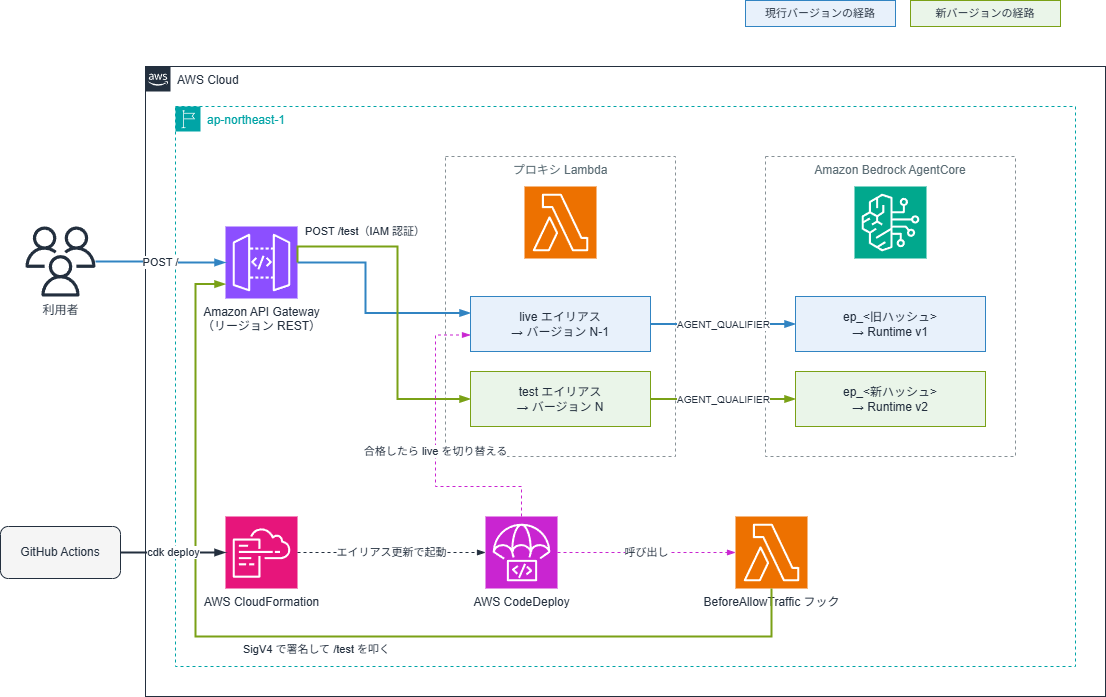
live と test が別々のAgentCoreエンドポイントを指しているところがミソ(MISO)です。
フックは test 側だけを叩くので、判定が終わるまで利用者には新しいバージョンが見えません。
CDK実装
L3コンストラクトにまとめたので、使う側はこれだけです。
|
1 2 3 4 |
new BlueGreenAgentApi(this, 'BlueGreen', { runtime, buildId: this.node.tryGetContext('buildId'), }); |
中で何をしているかを順に見ていきます。
エンドポイントはデプロイごとに作る
固定名をひとつ使い回すと、新しいバージョンが発行されたタイミングでブルーとグリーンが同じものを指してしまいます。
|
1 2 3 4 5 |
const endpointName = `ep_${props.buildId.replace(/[^a-zA-Z0-9]/g, '_')}`; this.agentEndpoint = props.runtime.addEndpoint(endpointName, { version: props.runtime.agentRuntimeVersion, }); |
buildId にはコミットハッシュを渡します。
デプロイのたびに名前が一意になりますし、プロキシがこの値を応答ヘッダ(x-proxy-build-id)に載せるので、いま動いているのがどのコミットかを外から辿れます。
ep_ を頭に付けているのは、エンドポイント名に数字始まりの文字列を指定できないという制約があるからです。
コミットハッシュは数字から始まることがあるので、プリフィックスをつけることで対応しました。また、ハイフンも使えないため replace で変換しています。
version に agentRuntimeVersion を渡しているのも大事なところです。
ここを '1' のようなリテラルで固定すると、エージェントを更新してもエンドポイントが古いバージョンを指したままになってしまいます。
エイリアスを2つ立てる
|
1 2 3 4 5 6 7 8 9 |
this.alias = new lambda.Alias(this, 'Live', { aliasName: 'live', version: this.proxyFunction.currentVersion, }); this.testAlias = new lambda.Alias(this, 'Test', { aliasName: 'test', version: this.proxyFunction.currentVersion, }); |
どちらも同じ「今回のバージョン」を指していますが、更新されるタイミングが違います。
live はCodeDeployが切り替えるまで古いバージョンを指したままですが、test はCloudFormationがそのまま更新するので、先に新しいバージョンを指します。
この違いを利用すると、切り替え前の検証に使うことができます。
currentVersion は、環境変数を含む変更のたびに新しいバージョンを発行してくれます。
CodeDeployにフックを渡す
|
1 2 3 4 5 6 7 8 9 |
this.deploymentGroup = new codedeploy.LambdaDeploymentGroup(this, 'Deployment', { alias: this.alias, deploymentConfig: codedeploy.LambdaDeploymentConfig.ALL_AT_ONCE, autoRollback: { failedDeployment: true }, preHook: this.preTrafficHook, }); // フックが結果を返すための権限 this.deploymentGroup.grantPutLifecycleEventHookExecutionStatus(this.preTrafficHook); |
autoRollback にアラーム連動(deploymentInAlarm)は入れていません。
合否はフックが持つので failedDeployment だけで足ります。
grantPutLifecycleEventHookExecutionStatus を忘れると、フックが判定できてもCodeDeployに伝えられません。
検証用の経路を追加する
|
1 2 3 4 5 6 7 8 9 10 |
this.api.root.addResource('test').addMethod( 'POST', new apigw.LambdaIntegration(this.testAlias, { proxy: true, timeout }), { authorizationType: apigw.AuthorizationType.IAM }, ); this.preTrafficHook.addToRolePolicy(new iam.PolicyStatement({ actions: ['execute-api:Invoke'], resources: [this.api.arnForExecuteApi('POST', '/test', stageName)], })); |
Cognito認証ではなくIAM認証にしているのは、呼び出すのがフックのLambdaでユーザーではないからです。
外部から到達できるURLが1つ増えるので、認証を付けておきます。
本番側の統合先も必ずエイリアスにします。
バージョンや $LATEST を直接指定すると、CodeDeployがエイリアスを切り替えても呼び出し先が変わらず、ブルーグリーンが成立しません。
更新順序を宣言する
|
1 2 3 4 |
this.alias.node.addDependency(this.deploymentGroup.role); this.alias.node.addDependency(this.preTrafficHook); this.alias.node.addDependency(this.agentEndpoint); this.alias.node.addDependency(this.testAlias); |
CodeDeployのデプロイは live の更新と同時に走ります。
そのタイミングで揃っていないと成立しないものが以下の4つです。
| 依存先 | ないとどうなるか |
|---|---|
| デプロイグループのサービスロール | フックを呼べずにデプロイが失敗する |
| フック本体とその権限 | 疎通が403になり、壊れていないのに失敗と判定する |
| AgentCoreエンドポイント | READYでないと疎通がResourceNotFoundになる |
test エイリアス |
旧バージョンを検証して、そのまま合格する |
フックのコード
IAM認証なので、SigV4で署名して投げます。
|
1 2 3 4 5 6 7 8 9 10 11 12 13 14 15 16 17 18 19 20 21 22 23 24 25 26 27 28 29 30 31 32 33 |
const signer = new SignatureV4({ service: 'execute-api', region: REGION, credentials: defaultProvider(), sha256: Sha256, }); async function signedProbe() { const url = new URL(PROBE_URL); const body = JSON.stringify({ prompt: 'codedeploy-pre-traffic-probe' }); const signed = await signer.sign(new HttpRequest({ method: 'POST', protocol: url.protocol, hostname: url.hostname, path: url.pathname, headers: { 'Content-Type': 'application/json', host: url.hostname }, body, })); const res = await fetch(PROBE_URL, { method: 'POST', headers: signed.headers as Record<string, string>, body, signal: AbortSignal.timeout(30_000), }); const text = await res.text(); if (!res.ok) return { ok: false, detail: `HTTP ${res.status}` }; // 200でも本文が空なら異常とみなす if (!text.trim()) return { ok: false, detail: 'HTTP 200 but empty body' }; return { ok: true, detail: text.slice(0, 200) }; } |
クレデンシャルは defaultProvider() に任せています。
Lambdaの実行ロールから渡ってくる一時的なものなので、キャッシュと再取得はSDKに任せたほうが楽です。
また、レスポンスストリーミングを返すエージェントの場合、API Gatewayの転送モードが既定の BUFFERED のままだと、Lambda単体では正しく応答しているのにAPI Gateway越しでは本文が空になります。
そういうケースを拾うために、200でも本文が空なら失敗にしています。
判定結果はCodeDeployに返します。
|
1 2 3 4 5 |
await codedeploy.send(new PutLifecycleEventHookExecutionStatusCommand({ deploymentId: event.DeploymentId, lifecycleEventHookExecutionId: event.LifecycleEventHookExecutionId, status, // 'Succeeded' か 'Failed' })); |
これを返し忘れると、デプロイがフックのタイムアウト(既定1時間)まで待ち続けます。
途中で例外を投げて抜けるパスを作らないよう、失敗も戻り値で表現するようにしました。
プロキシのコード
ブルーグリーンのポイントはこの部分です。
|
1 2 3 4 5 6 7 8 |
const AGENT_QUALIFIER = process.env.AGENT_QUALIFIER!; // ep_<コミットハッシュ> const res = await client.send(new InvokeAgentRuntimeCommand({ agentRuntimeArn: AGENT_RUNTIME_ARN, qualifier: AGENT_QUALIFIER, runtimeSessionId: sessionId, payload: new TextEncoder().encode(event.body ?? '{}'), })); |
どのAgentCoreエンドポイントを呼ぶかは環境変数で決まります。Lambdaのバージョンは環境変数も固定されるので、エイリアスを戻せば、参照先のAgentCoreバージョンごと戻ります。
応答には自分のビルドIDを返すようにしておきます。
|
1 2 3 4 5 6 7 8 9 |
return { statusCode: res.statusCode ?? 200, headers: { 'Content-Type': 'application/json', 'x-proxy-build-id': BUILD_ID, 'x-session-id': sessionId, }, body, }; |
検証用のエージェント側も本文にビルドIDを入れてあるので、ヘッダと本文が一致しているかを見れば、エンドポイントの参照が正しいかを確認できます。
ここがズレていたら、どこかで古いバージョンを指しているということになります。
なお、エージェントが5XXを返した場合はここに到達しません。
SDKが RuntimeClientError を投げるので、Lambdaのエラーになり、API Gatewayが502を返します。
フックはその502で失敗を検知します。
コード全文
抜粋だけだと繋がりが見えにくいので、全文も置いておきます。
使う側のスタック(lib/bluegreen-verify-stack.ts / 42行)
|
1 2 3 4 5 6 7 8 9 10 11 12 13 14 15 16 17 18 19 20 21 22 23 24 25 26 27 28 29 30 31 32 33 34 35 36 37 38 39 40 41 42 |
import * as path from 'path'; import * as cdk from 'aws-cdk-lib'; import { Construct } from 'constructs'; import * as agentcore from 'aws-cdk-lib/aws-bedrockagentcore'; import * as ecrAssets from 'aws-cdk-lib/aws-ecr-assets'; import { BlueGreenAgentApi } from './blue-green-agent-api'; /** * 検証用スタック。L3 コンストラクトがそのまま使えることを、この短さで示す。 * * npx cdk deploy -c buildId=v2-healthy 切り替え * npx cdk deploy -c buildId=v3-broken -c brokenMode=error500 ロールバックの検証 */ export class BlueGreenVerifyStack extends cdk.Stack { constructor(scope: Construct, id: string, props?: cdk.StackProps) { super(scope, id, props); const buildId = this.node.tryGetContext('buildId') ?? 'v1-healthy'; const brokenMode = this.node.tryGetContext('brokenMode') ?? 'none'; const runtime = new agentcore.Runtime(this, 'Agent', { runtimeName: 'bluegreen_verify', agentRuntimeArtifact: agentcore.AgentRuntimeArtifact.fromAsset( path.join(__dirname, 'agent'), // AgentCore Runtime は arm64 のイメージしか受け付けない { platform: ecrAssets.Platform.LINUX_ARM64 }, ), environmentVariables: { BUILD_ID: buildId, BROKEN_MODE: brokenMode, }, }); new BlueGreenAgentApi(this, 'BlueGreen', { runtime, buildId, }); new cdk.CfnOutput(this, 'RuntimeId', { value: runtime.agentRuntimeId }); new cdk.CfnOutput(this, 'RuntimeArn', { value: runtime.agentRuntimeArn }); } } |
L3コンストラクト(lib/blue-green-agent-api.ts / 173行)
|
1 2 3 4 5 6 7 8 9 10 11 12 13 14 15 16 17 18 19 20 21 22 23 24 25 26 27 28 29 30 31 32 33 34 35 36 37 38 39 40 41 42 43 44 45 46 47 48 49 50 51 52 53 54 55 56 57 58 59 60 61 62 63 64 65 66 67 68 69 70 71 72 73 74 75 76 77 78 79 80 81 82 83 84 85 86 87 88 89 90 91 92 93 94 95 96 97 98 99 100 101 102 103 104 105 106 107 108 109 110 111 112 113 114 115 116 117 118 119 120 121 122 123 124 125 126 127 128 129 130 131 132 133 134 135 136 137 138 139 140 141 142 143 144 145 146 147 148 149 150 151 152 153 154 155 156 157 158 159 160 161 162 163 164 165 166 167 168 169 170 171 172 173 |
import * as path from 'path'; import { Construct } from 'constructs'; import * as cdk from 'aws-cdk-lib'; import * as iam from 'aws-cdk-lib/aws-iam'; import * as lambda from 'aws-cdk-lib/aws-lambda'; import * as nodejs from 'aws-cdk-lib/aws-lambda-nodejs'; import * as apigw from 'aws-cdk-lib/aws-apigateway'; import * as codedeploy from 'aws-cdk-lib/aws-codedeploy'; import * as agentcore from 'aws-cdk-lib/aws-bedrockagentcore'; /** * AgentCore Runtime のブルーグリーンデプロイ。切り替え点を前段の Lambda に置く。 * * API Gateway ─→ Lambda エイリアス ─→ AgentCore エンドポイント ─→ Runtime * / live(本番) (ビルドごとに1つ) * /test test(検証用) * * デプロイの合否は BeforeAllowTraffic フックが持つ。 * `/test` を叩いて通らなければ、live は一度も新バージョンを指さない。 */ export interface BlueGreenAgentApiProps { readonly runtime: agentcore.Runtime; /** デプロイの識別子。コミットハッシュを想定。エンドポイント名と応答ヘッダに載る */ readonly buildId: string; /** プロキシに環境変数として渡すだけ。まだ使っていない */ readonly memoryId?: string; /** @default Duration.seconds(29) 29秒超はリージョン API とプライベート API のみ */ readonly integrationTimeout?: cdk.Duration; /** @default LambdaDeploymentConfig.ALL_AT_ONCE */ readonly deploymentConfig?: codedeploy.ILambdaDeploymentConfig; } export class BlueGreenAgentApi extends Construct { public readonly api: apigw.RestApi; public readonly proxyFunction: nodejs.NodejsFunction; public readonly agentEndpoint: agentcore.RuntimeEndpoint; /** 本番トラフィックが向く先。CodeDeploy がこれを切り替える */ public readonly alias: lambda.Alias; /** 常に新バージョンを指す。切り替え前の検証用 */ public readonly testAlias: lambda.Alias; public readonly deploymentGroup: codedeploy.LambdaDeploymentGroup; public readonly preTrafficHook: nodejs.NodejsFunction; constructor(scope: Construct, id: string, props: BlueGreenAgentApiProps) { super(scope, id); const stack = cdk.Stack.of(this); // エンドポイントはデプロイごとに作る。固定名だと blue と green が同じものを指す。 // 名前は [a-zA-Z][a-zA-Z0-9_]{0,47} なので数字始まりとハイフンが通らない。 // RETAIN は付けない。失敗したデプロイの残骸が残り 409 で再デプロイできなくなる。 const endpointName = `ep_${props.buildId.replace(/[^a-zA-Z0-9]/g, '_')}`; // version をリテラルで固定すると、エージェントを変えても旧バージョンを指したままになる this.agentEndpoint = props.runtime.addEndpoint(endpointName, { version: props.runtime.agentRuntimeVersion, }); this.proxyFunction = new nodejs.NodejsFunction(this, 'Proxy', { runtime: lambda.Runtime.NODEJS_22_X, entry: path.join(__dirname, '..', 'lambda', 'proxy', 'index.ts'), handler: 'handler', timeout: cdk.Duration.minutes(15), bundling: { // SDK は同梱されている保証がないのでバンドルする。 // ESM 出力に CJS の SDK を入れると require が無くて落ちるので banner で補う。 externalModules: [], format: nodejs.OutputFormat.ESM, target: 'node22', banner: "import{createRequire}from'module';const require=createRequire(import.meta.url);", }, environment: { AGENT_RUNTIME_ARN: props.runtime.agentRuntimeArn, AGENT_QUALIFIER: endpointName, BUILD_ID: props.buildId, ...(props.memoryId ? { MEMORY_ID: props.memoryId } : {}), }, description: `AgentCore プロキシ (${props.buildId} -> ${endpointName})`, }); this.proxyFunction.addToRolePolicy(new iam.PolicyStatement({ actions: ['bedrock-agentcore:InvokeAgentRuntime'], resources: ['*'], })); // live は CodeDeploy が切り替える。test は CloudFormation が更新するので先に新版を指す this.alias = new lambda.Alias(this, 'Live', { aliasName: 'live', version: this.proxyFunction.currentVersion, }); this.testAlias = new lambda.Alias(this, 'Test', { aliasName: 'test', version: this.proxyFunction.currentVersion, }); // 切り替え前の検証。Failed を返せば live は一度も新バージョンを指さない this.preTrafficHook = new nodejs.NodejsFunction(this, 'PreTrafficHook', { runtime: lambda.Runtime.NODEJS_22_X, entry: path.join(__dirname, '..', 'lambda', 'hook', 'pre-traffic.ts'), handler: 'handler', timeout: cdk.Duration.minutes(2), bundling: { externalModules: [], format: nodejs.OutputFormat.ESM, target: 'node22', banner: "import{createRequire}from'module';const require=createRequire(import.meta.url);", }, description: `切り替え前の検証 (${props.buildId})`, }); this.deploymentGroup = new codedeploy.LambdaDeploymentGroup(this, 'Deployment', { alias: this.alias, deploymentConfig: props.deploymentConfig ?? codedeploy.LambdaDeploymentConfig.ALL_AT_ONCE, // アラームはゲートに使わない。判定が間に合わず偽陽性も出る autoRollback: { failedDeployment: true }, preHook: this.preTrafficHook, }); this.deploymentGroup.grantPutLifecycleEventHookExecutionStatus(this.preTrafficHook); // CodeDeploy は live の更新と同時に走る。その時点で揃っていないと成立しないものを宣言する。 // とくに test エイリアスは、更新前だと旧バージョンを検証したまま合格してしまう。 this.alias.node.addDependency(this.deploymentGroup.role); this.alias.node.addDependency(this.preTrafficHook); this.alias.node.addDependency(this.agentEndpoint); this.alias.node.addDependency(this.testAlias); // ステージ名はリテラルで持つ。deploymentStage を参照すると循環する const stageName = 'prod'; this.api = new apigw.RestApi(this, 'Api', { restApiName: `agent-api-${cdk.Names.uniqueId(this).slice(-8)}`, endpointConfiguration: { types: [apigw.EndpointType.REGIONAL] }, deployOptions: { stageName, metricsEnabled: true, tracingEnabled: true }, }); const timeout = props.integrationTimeout ?? cdk.Duration.seconds(29); // 統合先は必ずエイリアス。バージョンを直接指すと切り替えても呼び出し先が変わらない const liveIntegration = new apigw.LambdaIntegration(this.alias, { proxy: true, timeout }); this.api.root.addMethod('POST', liveIntegration); this.api.root.addResource('{proxy+}').addMethod('ANY', liveIntegration); // 検証用の経路。叩くのはフックの Lambda なので IAM 認証にする const testPath = 'test'; this.api.root.addResource(testPath).addMethod( 'POST', new apigw.LambdaIntegration(this.testAlias, { proxy: true, timeout }), { authorizationType: apigw.AuthorizationType.IAM }, ); this.preTrafficHook.addToRolePolicy(new iam.PolicyStatement({ actions: ['execute-api:Invoke'], resources: [this.api.arnForExecuteApi('POST', `/${testPath}`, stageName)], })); // api.url を渡すと循環するので restApiId から組み立てる this.preTrafficHook.addEnvironment( 'PROBE_URL', `https://${this.api.restApiId}.execute-api.${stack.region}.${stack.urlSuffix}/${stageName}/${testPath}`, ); new cdk.CfnOutput(this, 'ApiUrl', { value: this.api.url }); new cdk.CfnOutput(this, 'AliasArn', { value: this.alias.functionArn }); } } |
プロキシ(lambda/proxy/index.ts / 57行)
|
1 2 3 4 5 6 7 8 9 10 11 12 13 14 15 16 17 18 19 20 21 22 23 24 25 26 27 28 29 30 31 32 33 34 35 36 37 38 39 40 41 42 43 44 45 46 47 48 49 50 51 52 53 54 55 56 57 |
import { BedrockAgentCoreClient, InvokeAgentRuntimeCommand, } from '@aws-sdk/client-bedrock-agentcore'; // 値として import すると esbuild が解決に失敗するので型のみ import type { APIGatewayProxyEvent, APIGatewayProxyResult } from 'aws-lambda'; import { randomUUID } from 'crypto'; /** * API Gateway と AgentCore Runtime の間に立つプロキシ。 * どのエンドポイントを呼ぶかは環境変数で固定されるので、 * エイリアスの向き先を変えるだけで切り替わる。 */ const client = new BedrockAgentCoreClient({}); const AGENT_RUNTIME_ARN = process.env.AGENT_RUNTIME_ARN!; const AGENT_QUALIFIER = process.env.AGENT_QUALIFIER!; const BUILD_ID = process.env.BUILD_ID ?? 'unknown'; /** runtimeSessionId は 33 文字以上 256 文字以下 */ function resolveSessionId(event: APIGatewayProxyEvent): string { const fromHeader = event.headers?.['x-session-id'] ?? event.headers?.['X-Session-Id']; return fromHeader ?? `${Date.now()}${randomUUID().replace(/-/g, '')}`; } export const handler = async ( event: APIGatewayProxyEvent, ): Promise<APIGatewayProxyResult> => { const sessionId = resolveSessionId(event); const res = await client.send( new InvokeAgentRuntimeCommand({ agentRuntimeArn: AGENT_RUNTIME_ARN, qualifier: AGENT_QUALIFIER, runtimeSessionId: sessionId, payload: new TextEncoder().encode(event.body ?? '{}'), }), ); // Node では SdkStream。transformToString で読み切る const body = (await (res.response as { transformToString(): Promise<string> } | undefined) ?.transformToString()) ?? ''; // エージェントが 5XX を返すとここには来ない。SDK が RuntimeClientError を投げ、 // Lambda のエラーになり、API Gateway が 502 を返す return { statusCode: res.statusCode ?? 200, headers: { 'Content-Type': 'application/json', // 応答本文の build_id と突き合わせる。ズレていたら参照先が壊れている 'x-proxy-build-id': BUILD_ID, 'x-session-id': sessionId, }, body, }; }; |
BeforeAllowTraffic フック(lambda/hook/pre-traffic.ts / 106行)
|
1 2 3 4 5 6 7 8 9 10 11 12 13 14 15 16 17 18 19 20 21 22 23 24 25 26 27 28 29 30 31 32 33 34 35 36 37 38 39 40 41 42 43 44 45 46 47 48 49 50 51 52 53 54 55 56 57 58 59 60 61 62 63 64 65 66 67 68 69 70 71 72 73 74 75 76 77 78 79 80 81 82 83 84 85 86 87 88 89 90 91 92 93 94 95 96 97 98 99 100 101 102 103 104 105 106 |
import { CodeDeployClient, PutLifecycleEventHookExecutionStatusCommand, } from '@aws-sdk/client-codedeploy'; import { SignatureV4 } from '@smithy/signature-v4'; import { HttpRequest } from '@smithy/protocol-http'; import { Sha256 } from '@aws-crypto/sha256-js'; import { defaultProvider } from '@aws-sdk/credential-provider-node'; /** * CodeDeploy の BeforeAllowTraffic フック。デプロイの合否を決める。 * Failed を返せば live は一度も新バージョンを指さない。 * * 検証先は test エイリアスに繋いだ `/test`。IAM 認証なので SigV4 で署名する。 * Lambda を直接 invoke するより広く、API Gateway 側の設定ミスまで拾える。 */ interface HookEvent { DeploymentId: string; LifecycleEventHookExecutionId: string; } const codedeploy = new CodeDeployClient({}); const PROBE_URL = process.env.PROBE_URL; const REGION = process.env.AWS_REGION!; const PROBE_ATTEMPTS = Number(process.env.PROBE_ATTEMPTS ?? '3'); const PROBE_INTERVAL_SECONDS = Number(process.env.PROBE_INTERVAL_SECONDS ?? '5'); const sleep = (ms: number) => new Promise((r) => setTimeout(r, ms)); const signer = new SignatureV4({ service: 'execute-api', region: REGION, credentials: defaultProvider(), sha256: Sha256, }); async function signedProbe(): Promise<{ ok: boolean; detail: string }> { if (!PROBE_URL) return { ok: true, detail: 'no probe url' }; const url = new URL(PROBE_URL); const body = JSON.stringify({ prompt: 'codedeploy-pre-traffic-probe' }); const signed = await signer.sign( new HttpRequest({ method: 'POST', protocol: url.protocol, hostname: url.hostname, path: url.pathname, headers: { 'Content-Type': 'application/json', host: url.hostname }, body, }), ); try { const res = await fetch(PROBE_URL, { method: 'POST', headers: signed.headers as Record<string, string>, body, signal: AbortSignal.timeout(30_000), }); const text = await res.text(); if (!res.ok) { return { ok: false, detail: `HTTP ${res.status}: ${text.slice(0, 300)}` }; } // 200 でも本文が空なら異常。配線ミスがこの形で出たことがある if (!text.trim()) { return { ok: false, detail: 'HTTP 200 but empty body' }; } return { ok: true, detail: text.slice(0, 200) }; } catch (err) { return { ok: false, detail: `threw: ${String(err)}` }; } } export const handler = async (event: HookEvent): Promise<void> => { let status: 'Succeeded' | 'Failed' = 'Failed'; let reason = 'no attempt'; console.log(`pre-traffic check start: probe=${PROBE_URL ?? 'none'}`); // 1回でも通れば合格。コールドスタートで落ちることがあるため連続失敗では見ない for (let i = 1; i <= PROBE_ATTEMPTS; i++) { const { ok, detail } = await signedProbe(); console.log(`attempt ${i}/${PROBE_ATTEMPTS}: ${ok ? 'ok' : 'NG'} ${detail}`); if (ok) { status = 'Succeeded'; reason = `probe ok on attempt ${i}`; break; } reason = `probe failed ${i} times: ${detail}`; if (i < PROBE_ATTEMPTS) await sleep(PROBE_INTERVAL_SECONDS * 1000); } console.log(`pre-traffic check finished: ${status} (${reason})`); // 返し忘れるとデプロイがフックのタイムアウトまで固まる await codedeploy.send( new PutLifecycleEventHookExecutionStatusCommand({ deploymentId: event.DeploymentId, lifecycleEventHookExecutionId: event.LifecycleEventHookExecutionId, status, }), ); }; |
結果
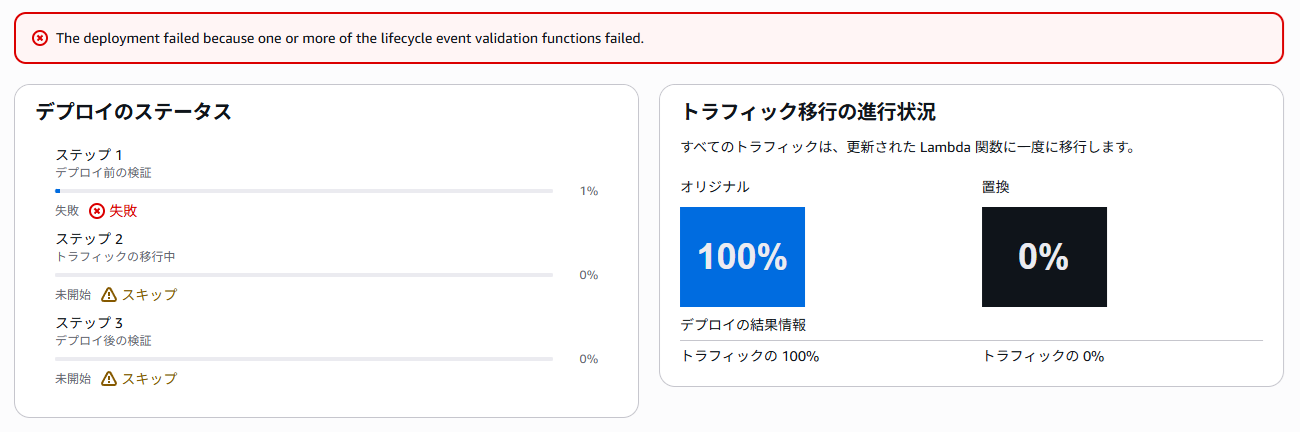
500を返すバージョンをデプロイすると、ライフサイクルイベントはこうなりました。
|
1 2 3 |
BeforeAllowTraffic 18:08:13.414 → 18:08:29.572 Failed AllowTraffic None Skipped AfterAllowTraffic None Skipped |
フックのログはこんな感じです。
|
1 2 3 4 5 |
pre-traffic check start: probe=https://xxxxx.execute-api.ap-northeast-1.amazonaws.com/prod/test attempt 1/3: NG HTTP 502 attempt 2/3: NG HTTP 502 attempt 3/3: NG HTTP 502 pre-traffic check finished: Failed (probe failed 3 times) |
AllowTraffic がSkippedです。エイリアスは一度も動いていません。
実測したところ、339回叩いてすべて200でした。
cdk deploy は失敗で終わり、今回のビルドで作ったエンドポイントも削除されています。
ちなみに正常時のデプロイ時間は270秒ぐらいでした。
まとめ
「不具合のあるビルドを公開する前に止める」ということを実現できました。ポイントは2つです。
BeforeAllowTrafficで判定する。 トラフィックを流したあとに気づく方式だと、気づくまでの間ユーザーに影響が出ます。切り替える前に判定すれば、その時間がゼロになります- 検証はAPI Gateway越しに行う。 Lambdaを直接呼ぶ形だと、その手前の設定ミスを見逃します。
testエイリアスと/testを用意したぶん構成は増えましたが、経路全体を通せるようになりました
一方で、止められるのは決まった入力で再現するものだけです。
特定の入力や負荷でだけ落ちるものは、この仕組みでは分かりません。
冒頭に挙げたもう1つ、HTTP 200を返しながら品質が落ちているケースも同じで、疎通確認だけでは検知できません。
振り返ってみると、AgentCore固有の工夫はエンドポイントの扱いくらいで、CodeDeployの普通のブルーグリーンと考え方は同じでした。
AIエージェントだからといって特別な仕組みを持ち出す必要はなく、やはりここはビルディングブロックの考え方が活きたと言えるでしょう。

執筆者プロフィール

- TDI デジタルイノベーション技術部
-
昔も今も新しいものが大好き!
インフラからアプリまで縦横無尽にトータルサポートや新技術の探求を行っています。
週末はときどきキャンプ場に出没します。
2024-2026 Japan AWS All Certifications Engineer
2026 Japan AWS Top Engineer